

School ERP Software for Attendance, Fees, Exams and Parent Communication
Onexa ERP is cloud-based school ERP software that manages admissions, student records, attendance, timetables, exams, fees, learning tools and parent communication in one system. It includes a web ERP for administrators and two mobile apps: Onexa Campus for parents and students, and Onexa Teachers for staff. Schools start with the modules they need and add more later.
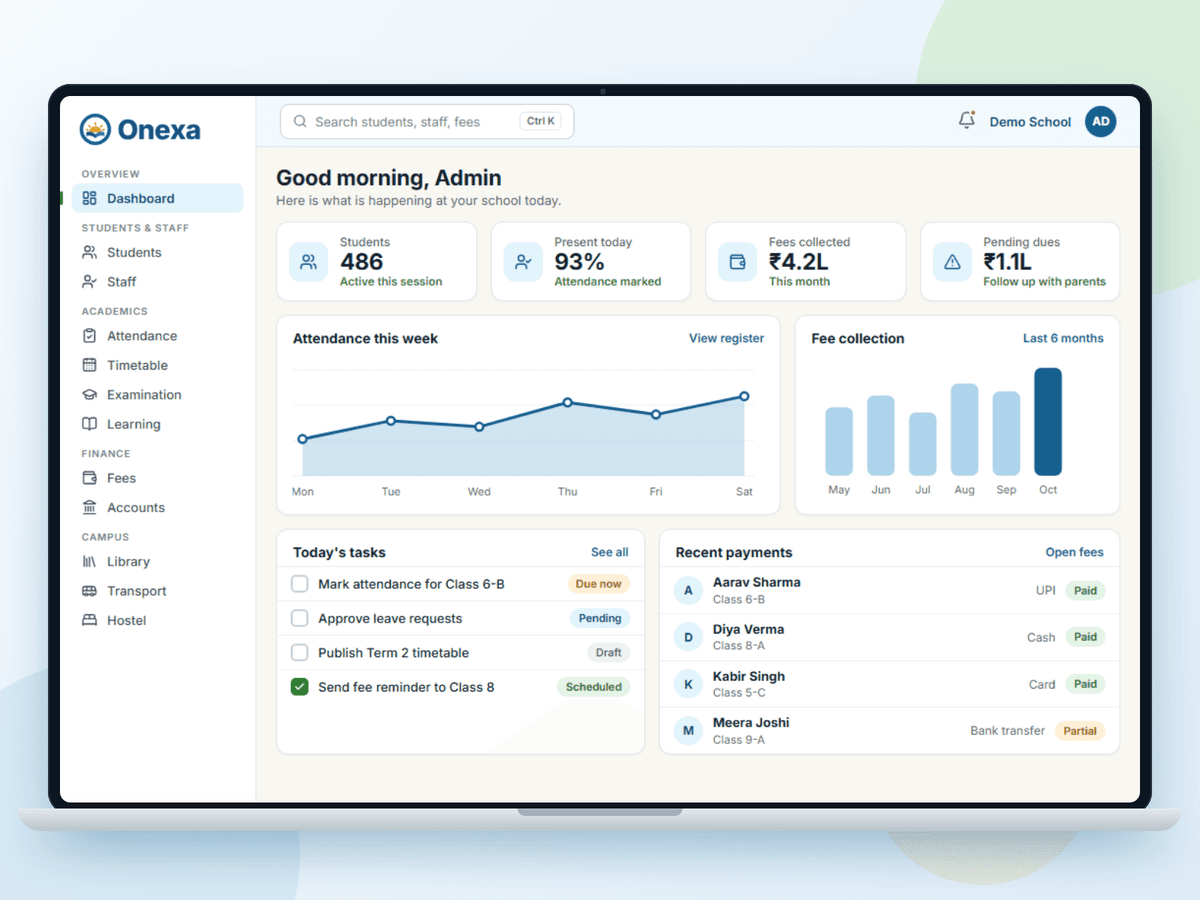
What is a school ERP?
A school ERP (enterprise resource planning) system is software that runs a school's daily operations from one shared database. Instead of separate registers, spreadsheets and apps for attendance, fees and exams, every department uses the same student, class and staff records. Information is entered once and appears everywhere it is needed, including in the parent app.
Learn more: What Is a School ERP? Modules, Benefits and Features
- Built for
- Schools: administrators, teachers, accounts staff, parents and students
- Core modules
- Student and staff records, attendance, timetable, exams, fees, homework, communication
- Mobile apps
- Onexa Campus (parents and students), Onexa Teachers (staff)
- Rollout model
- Modular: start with a few modules, add more later
- Data migration
- Supported from paper registers and spreadsheets
- Based in
- Ambala City, Haryana, India
- Pricing
- Quoted per school based on modules and rollout scope
What Onexa ERP does
Everything a school runs on, in one system
Each module shares the same student, class, and staff records, so information is entered once and used everywhere. Schools switch on only the modules they need.
Student and staff records
Admissions, student profiles, guardians, staff records, and leave in one place that every other module reuses.
Attendance
Mark daily or lecture attendance from the web or the teacher app, and let parents see it in theirs.
Timetable and exams
Class timetables with cover for absent teachers, plus marks entry, grading, report cards, and admit cards.
Fees and accounts
Fee structures, invoices, payment records by method, adjustments, and receipts for the accounts team.
Homework and learning tools
Share homework, study materials, and files with classes. Students and parents see them in the app.
Parent and teacher apps
Onexa Campus for parents and students, Onexa Teachers for staff, both using the same school records.
Built for every role
One platform, a clear view for each person
Administrators
Set up classes, manage admissions, switch modules on, and review reports.
Teachers
Mark attendance, enter marks, share homework, and apply for leave from a phone.
Accounts staff
Raise fee invoices, record payments, issue receipts, and follow pending dues.
Parents and students
Check attendance, homework, results, fees, and notices in one app.
How does a school get started with Onexa ERP?
- 1
Book a demo. Tell us which workflows take the most time today.
- 2
Choose your modules. Most schools start with students, attendance and fees.
- 3
Move your records. We help import data from registers and spreadsheets.
- 4
Roll out in phases. Train staff first, then bring in parents through the Onexa Campus app.
- 5
Add modules later. Turn on exams, learning tools or campus services when you are ready.
Why do schools choose Onexa ERP?
- One system instead of many: attendance, fees, exams and communication share the same records.
- Start small: begin with two or three modules and expand without switching software.
- Cloud-based: access from the web or mobile without installing software on school computers.
- Parent visibility: families see attendance, homework, results and fees in their own app.
- Migration help: we plan the move from paper registers and spreadsheets with you.
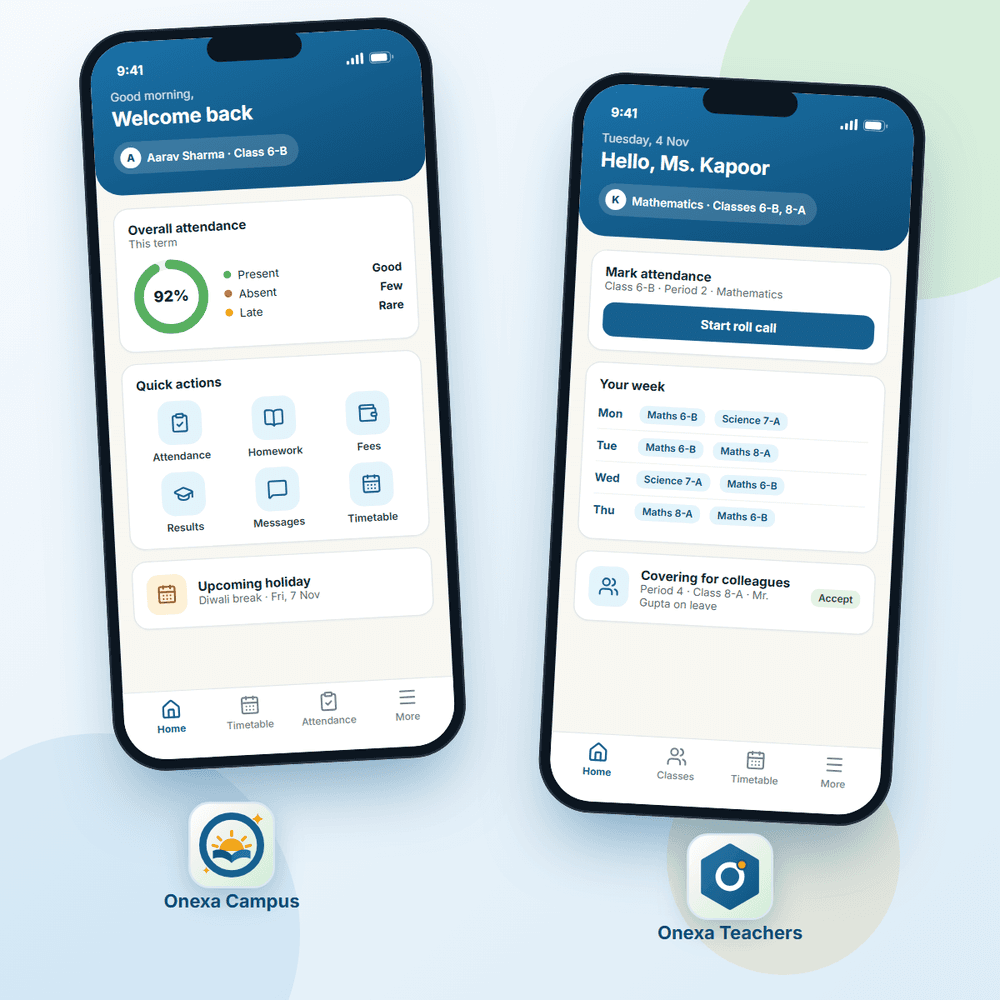
Onexa Campus for parents and students, Onexa Teachers for staff
Both apps read from the same records as the web ERP, so teachers enter information once and families see it straight away.
- Parents and students: attendance, homework, results, fees, messages, and the school calendar.
- Teachers: attendance, marks, homework, messages, leave, and staff check-in.
- Push notifications for notices and updates.
Read more in why schools need a parent-teacher app.
From the blog
Guides for school leaders
 School ERP Basics
What Is a School ERP? Modules, Benefits and Features
A school ERP puts admissions, attendance, exams, fees, staff and parent communication in one system. See what it includes and how to tell if your school needs one.
 School ERP Basics
How to Choose a School ERP: A Buyer's Checklist
Choosing school management software is easier with a checklist. Compare modules, roles, mobile apps, data migration, support, and security before you commit.
 Attendance
Digital Attendance for Schools: A Practical Guide
Digital attendance replaces paper registers with fast, searchable records. Learn how it works for students and staff and how parents get notified.
Questions
Frequently asked questions
What is Onexa ERP?
Onexa ERP is a cloud school ERP that brings admissions, student records, attendance, timetables, exams, fees, learning tools, staff management and parent communication into one platform. It includes a web ERP for administrators and two mobile apps: Onexa Campus for parents and students, and Onexa Teachers for staff.
Which modules does Onexa ERP include?
Onexa ERP covers students and staff, academics, finance, campus services such as library, hostel and transport, and communication and reports. Each school switches on only the modules it needs, so you do not manage features you do not use.
Is there a mobile app for parents and teachers?
Yes. Onexa Campus is for parents and students, and Onexa Teachers is for teachers and staff. Both apps use the same records as the web ERP, so attendance, homework and notices entered by teachers appear for parents straight away.
Can we start with only a few modules?
Yes. Onexa ERP is modular, so a school can begin with the areas it needs most, such as student records, attendance and fees, and add exams, learning tools or campus services later without changing software.
Can you move our existing records into the system?
Yes. We can discuss importing data from paper registers and spreadsheets and plan a phased rollout with your team. Contact us to talk through your current records and the best way to migrate them.
How much does a school ERP cost?
Onexa ERP pricing depends on the modules and rollout scope your school needs. Book a demo or send us a message, and we will prepare an estimate for your school.
How does attendance work in Onexa ERP?
Teachers mark daily or lecture-wise attendance from the web ERP or the Onexa Teachers app. Parents can then view it in the Onexa Campus app, and administrators can review attendance reports across classes.
How do parents track school fees?
Accounts staff set up fee structures, raise invoices, record payments by method and issue receipts. Parents can view their fee details in the Onexa Campus app, and accounts staff can follow pending dues in one view.
Is Onexa ERP cloud-based?
Yes. Onexa ERP is a cloud school ERP, so staff access it through the web and mobile apps without installing server software at the school.
Who builds Onexa ERP?
Onexa ERP is built by DataCraffix and offered as Onexa ERP Solutions from Ambala City, Haryana, India. To book a demo or discuss your requirements, email info@onexaerpsolutions.com or call +91 95181 76615.
Ready to see Onexa ERP for your school?
Tell us which workflows take the most time today. We will walk you through the modules that fit and plan a rollout that suits your school.
Last updated: